Tasks
The task record: state, priority, assignment, sub-tasks, attachments, comments and logged time.
/admin/projects/[project]/tasks/[task] — one piece of work. Everything a task carries
is on this page: what it is, who has it, when it is due, what it belongs to, what has been said
about it, what is attached to it and how long it has taken.
#The fields
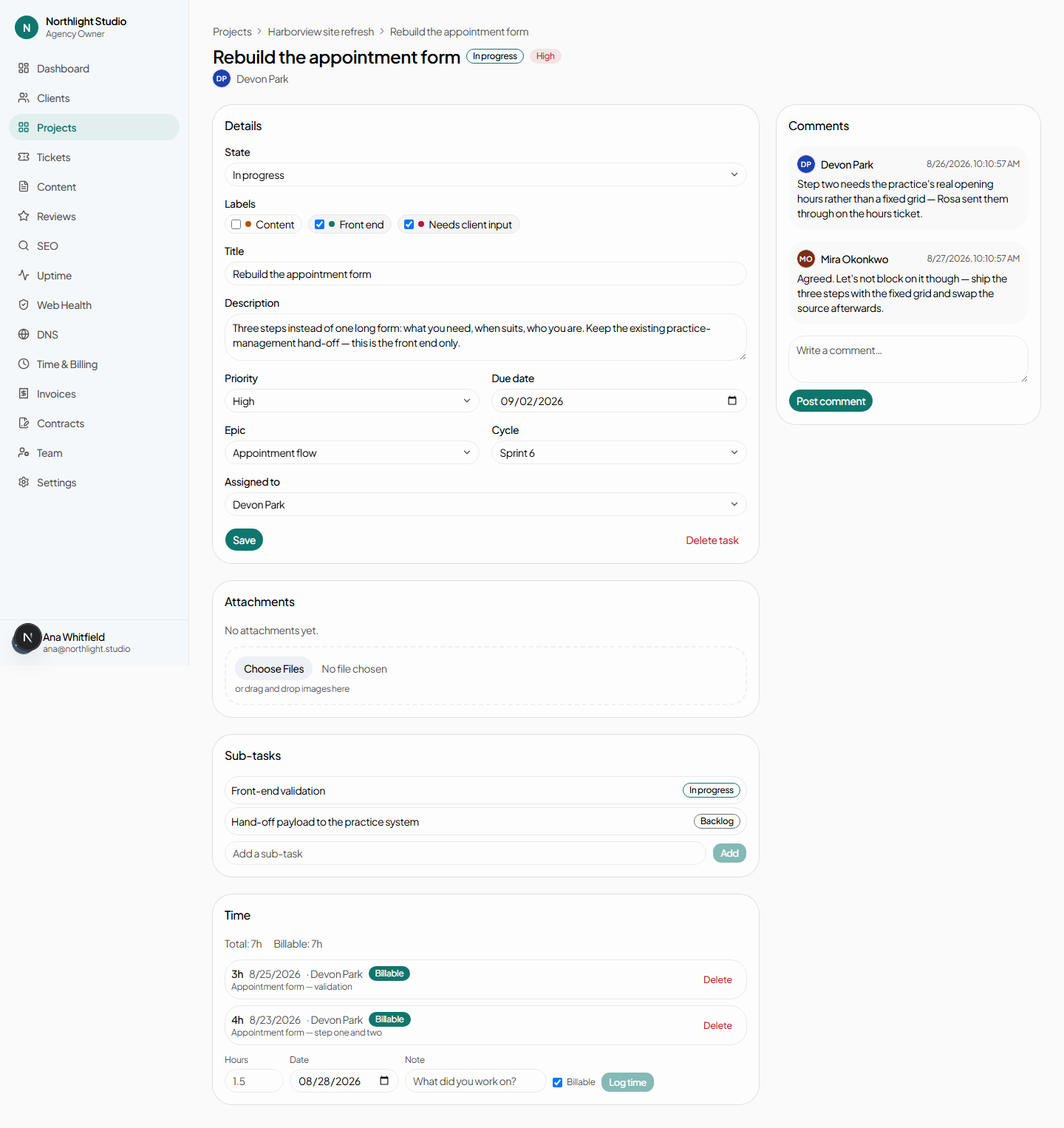
| Field | Notes |
|---|---|
| Title | What the card shows on the board. |
| Description | Free text. |
| State | One of the project's workflow states. Changing it here moves the card on the board, and the reverse is also true. |
| Priority | Low, Medium or High. |
| Due date | Optional. |
| Epic | Or No epic. |
| Cycle | Or No cycle. |
| Assigned to | Or Unassigned. |
| Labels | Chips you click to toggle. Labels are defined agency-wide on the projects list. |
Save applies the changes. Delete task is behind a confirmation.
#Sub-tasks
Type a title and press Add. A sub-task is a full task in its own right — it gets its own page, its own state, its own assignee and its own time entries, and its breadcrumbs name the parent it belongs to.
Use them when a piece of work needs splitting between people, and a checklist when it does not.
#Attachments
Pick files or drag them onto the drop area. Each one can be removed. Files go directly to storage from the browser and the record is only written once the upload has finished, so a failed upload leaves nothing behind.
#Logging time
Four fields, and all four matter:
| Field | Why it matters |
|---|---|
| Hours | Decimal — 1.5 is an hour and a half. |
| Note | Appears on the invoice line if this time is billed. |
| Worked-at date | The day the work happened, not the day you typed it. The time report and every invoice are built on this field. |
| Billable | Unticked time still counts towards hours logged and utilisation; it just never reaches an invoice. |
Entries are listed underneath with who logged them, and each can be deleted behind a confirmation.
#Comments
A plain thread, visible to your team only. Clients never see projects or tasks, so there is no internal-note distinction here — everything on this page is internal.
#Tasks from a converted ticket
A task created by converting a ticket carries a Converted from ticket → badge linking back to the request that started it. See Tickets.