Projects
Boards, cycles, epics, workflow states and labels for work bigger than a ticket.
/admin/projects — for work that is bigger than a request. A project holds tasks on a
board, organised into cycles and epics, with workflow states you define and labels you share across
every project.
#The list
- Active / Completed / Archived / All, each with a count.
- Client filter — including agency-internal projects with no client.
- Search projects…
- Previous / Next for pagination.
#Labels
Labels opens a dialog. Labels are defined once for the whole agency — name plus a colour — and are then available on every task in every project. Delete one with the ×; it comes off every task that carried it.
#Creating a project
New project asks for a name, an optional client, and a description. Leaving the client as Agency-internal (no client) is the right choice for your own work — a website rebuild for yourselves, a recruitment push — and keeps it out of client-filtered views.
Saving opens the project.
#Board
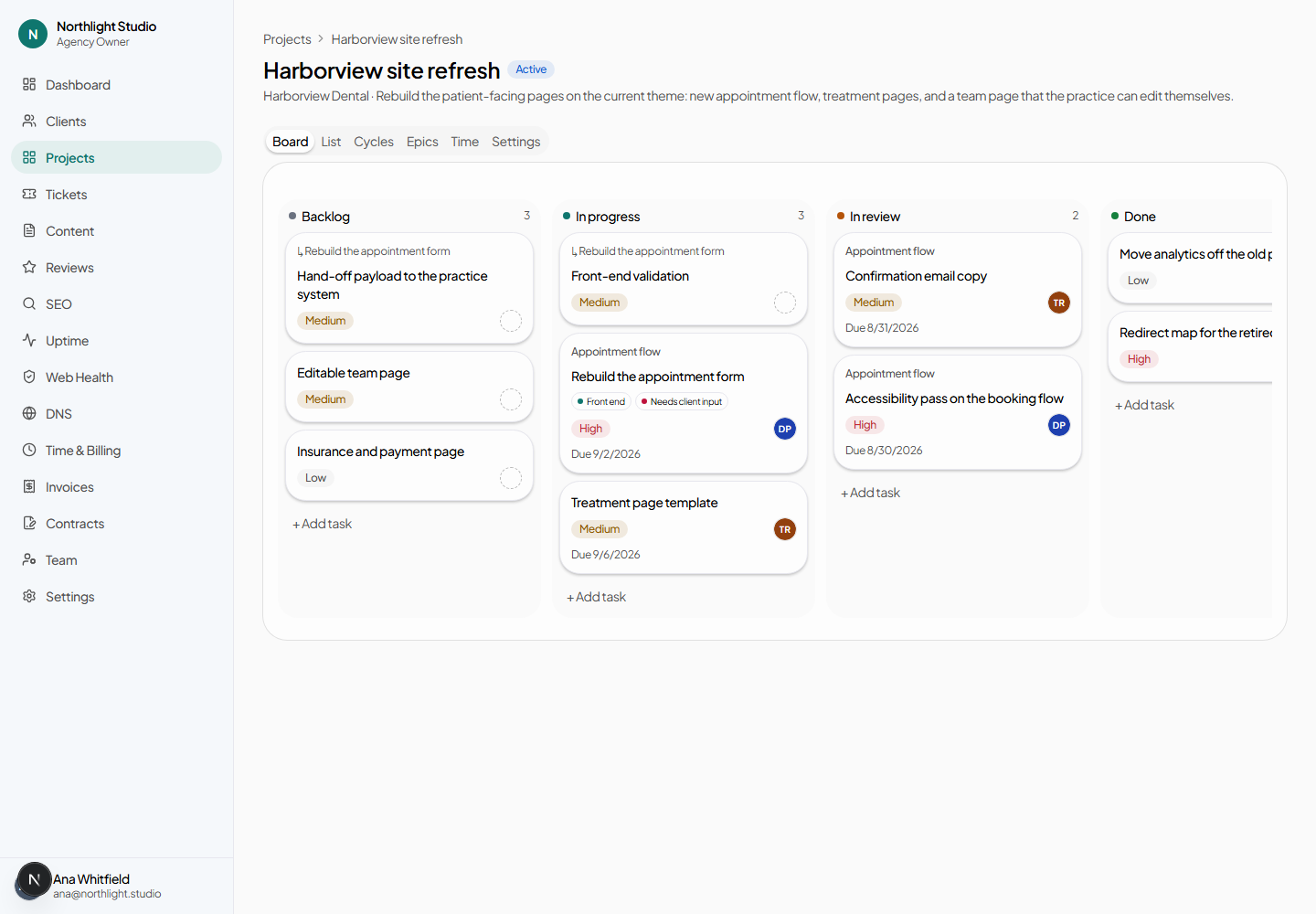
One column per workflow state. Cards can be dragged between columns and reordered within one; dropping saves both the new state and the new ordering. Dragging starts after about 6 px of movement, so a click still opens the card rather than nudging it.
+ Add task at the top of a column adds one inline: type a title and press Enter to save, Esc to cancel. Clicking away also saves.
Clicking a card's title opens the task.
#List
The same tasks as a table, which is the better view when you want to scan due dates and assignees rather than move things about.
#Cycles
A cycle is a time box — a sprint, a month, a campaign period. + New cycle asks for a name, a start date and an end date. Each cycle carries a status you can change.
Delete cycle asks for confirmation. Tasks assigned to it are unassigned, not deleted — they return to having no cycle.
#Epics
An epic groups tasks by theme rather than by time: "checkout rebuild", "May campaign". A task can belong to one epic and one cycle at once, and neither is required.
Deleting an epic also unassigns its tasks rather than deleting them.
#Time
Every time entry logged against a task in this project, with a link to the task it belongs to. The agency-wide view is Time and billing.
#Settings
#Workflow states
The board's columns. Each has a name and a colour. Move state up and Move state down reorder them — that ordering is the left-to-right order of the board.
Delete state requires the column to be empty first. A state with tasks in it cannot be removed, because there is no correct answer to where those tasks should go and guessing would silently move somebody's work.
#Name, description and status
Project status is Active, Completed or Archived. Only Active projects appear in the command palette and in the default list filter.
#Deleting a project
Delete project is behind a confirmation that names what goes with it: its tasks and their comments. Time entries logged against those tasks have already been counted in the time report; deleting the project is not a way to reverse an invoice.
#Projects that came from a ticket
A project created by Convert to project on a ticket carries a Converted from ticket → badge, and the ticket carries the matching badge back. Tasks created by the conversion carry it too. See Tickets.