How AgencyDash is put together
Three portals, three levels of account, and one rule that decides what each person can see.
This page is the mental model. Everything else in this library assumes it, and most questions that feel confusing — why can't my writer see the SEO page, why did that client's portal only show two sections, why did a link 404 — turn out to be one of the four rules below.
#Three levels of account
Every record in AgencyDash belongs somewhere in a three-level hierarchy.
Platform                     admin.agencydash.cloud
 └─ Agency                   your-agency.agencydash.cloud
     └─ Client
└─ Location- Platform
- Us. The platform operators who provision agencies, set the price book, and keep the background job queue running. Platform staff sign in at a separate address and never appear inside your agency's team list.
- Agency
- You. One agency is one tenant: its own subdomain, its own staff, its own clients, its own branding, its own audit log. Nothing an agency does is visible to another agency, and there is no shared list anywhere that a second agency could appear in.
- Client
- A business you work for. A client has its own portal, its own people, its own modules, its own SLA and hourly rate, and — if you switch it on — its own approval chain for content.
- Location
- A physical place a client operates from. Locations matter for anything geographic: local search rankings are measured from a location, and Google reviews are collected per location. A client with one address still has one location.
#Three portals
Which portal you land in is decided by your session, not by the URL you typed. Going to
/admin with a client-scoped session redirects you to /portal, and the
reverse is also true. Signing out and back in as a different person is the only way to swap.
#The agency portal — /admin
Where your staff work. The sidebar carries Dashboard, Clients, Projects, Tickets, Content, Reviews, SEO, Uptime, Time & Billing, Invoices, Contracts, Team and Settings — though you will only see the entries your role has permission for. See Dashboard onward.
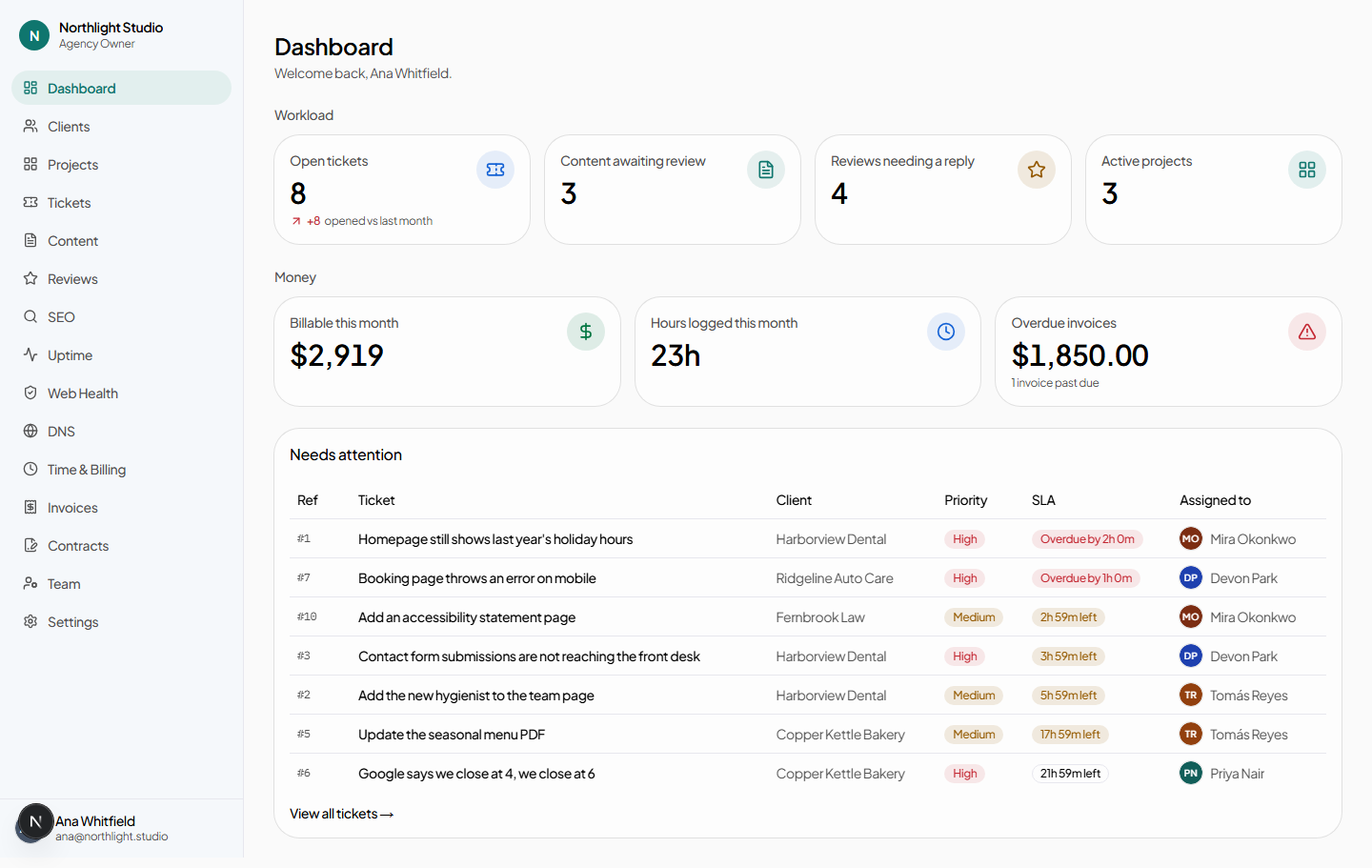
#The client portal — /portal
Where your clients work. Same subdomain, same branding, an entirely different navigation: Home, Requests, Content, Reviews, Search visibility, Agreements, Brand assets and Your team — and again, only the ones you have switched on for that client. See The client portal.
#The platform console — /superadmin
Ours. Reachable only from the platform hostname, and only by a platform-scoped session. If you are an agency user, this portal does not exist as far as your session is concerned — there is nothing in the agency portal that links to it, and nothing you can type that reaches it.
#Two gates decide what you see
Almost every "why can't I see this" question is one of exactly two checks, and it is worth knowing which is which because they are fixed in different places by different people.
| Gate | Question it answers | Set by | Where |
|---|---|---|---|
| Module | Does this client get this capability at all? | The agency, per client | Client record → Settings |
| Permission | Is this person allowed to do this? | The role on their membership | Roles and permissions |
The two combine in a specific order: reads are gated on the module, writes are gated on permissions. A client-side Viewer can open every section you have enabled and change nothing in any of them. An agency Content Writer holds content.create and nothing else, so the SEO link is not merely disabled for them — it is absent from the sidebar, and typing the URL returns a not-found page rather than an access-denied one.
#Nothing leaks between tenants
Every database query the application makes is scoped by agency. This is not a filter applied to the results — it is part of how the record is looked up in the first place. The practical consequences are worth knowing:
- Pasting another agency's record id into your own URL returns 404 Not found, not "access denied". The distinction matters: a denial would confirm the record exists.
- Search, the command palette, exports and the audit log are all scoped the same way. There is no view anywhere in the agency portal that reaches across tenants.
- Suspending an agency stops sign-in for its staff and its clients. Both see a "temporarily unavailable" page carrying a support address rather than a login form.
#Your name on everything
Your logo, your primary colour and your support address are applied as CSS variables to the whole shell — the sign-in page, every page of the agency portal, every page of every client's portal, and the public contract signing page. There is no plan or add-on that gates this; it is how the product works. Set it once in Agency settings.
Notification email is the one piece that starts out carrying the platform's address, because sending as you requires DNS records only you can publish. Add a domain in Sending from your own domain and mail switches over as soon as every record verifies — nothing breaks in between.
#The shape of the work
The modules are not a random pile of features; they follow the sequence an agency actually runs. Reading them in this order is the fastest way to understand what the product is for.
| Stage | What happens | Where |
|---|---|---|
| Win | Draft an agreement from a template, send it, get it signed with evidence that holds up. | Contracts |
| Onboard | Create the client, record their locations, websites and contacts, choose their modules, invite their people. | Clients |
| Deliver | Requests come in, work gets tracked, content gets written and approved. | Tickets, Projects, Content |
| Show | Rankings, reviews and uptime, in the client's own portal, without them asking. | SEO, Reviews, Uptime |
| Get paid | Hours logged against tickets and tasks become an invoice at the client's rate. | Time and billing, Invoices |
| Renew | Amend, terminate or re-sign the agreement; every version stays linked to the last. | Contracts → amendments |
#What runs on its own
Some of the platform works without anyone pressing anything: rank checks on the cadence you chose, crawl polling, uptime sweeps, contract expiry, approval digests, and the deletion of accounts you scheduled for closure. These are background jobs, they are visible to platform operators on the Operations page, and each one is documented in Background jobs.
The important consequence for day-to-day use: closing a tab never orphans work. A site crawl started this afternoon continues whether or not the browser that started it is still open.
#What gets recorded
Every action that changes something writes an audit entry naming the person, the time and the request address. Entries are append-only — nothing in the product can edit or delete one, including us. Agency staff with agency.view_audit read their own agency's log at Settings → Audit log; platform operators read every tenant's at once.