SEO
Rankings, keyword research, site crawls, page audits, Core Web Vitals, backlinks and AI recommendations — and what each of them costs.
Two pages, one module. /admin/seo is the agency-wide view — every client, worst first.
/admin/clients/[id]/seo is one client's, with five tabs. Almost everything here spends
money with a search-data provider, so every control that does says so before you press it.
#The agency-wide view
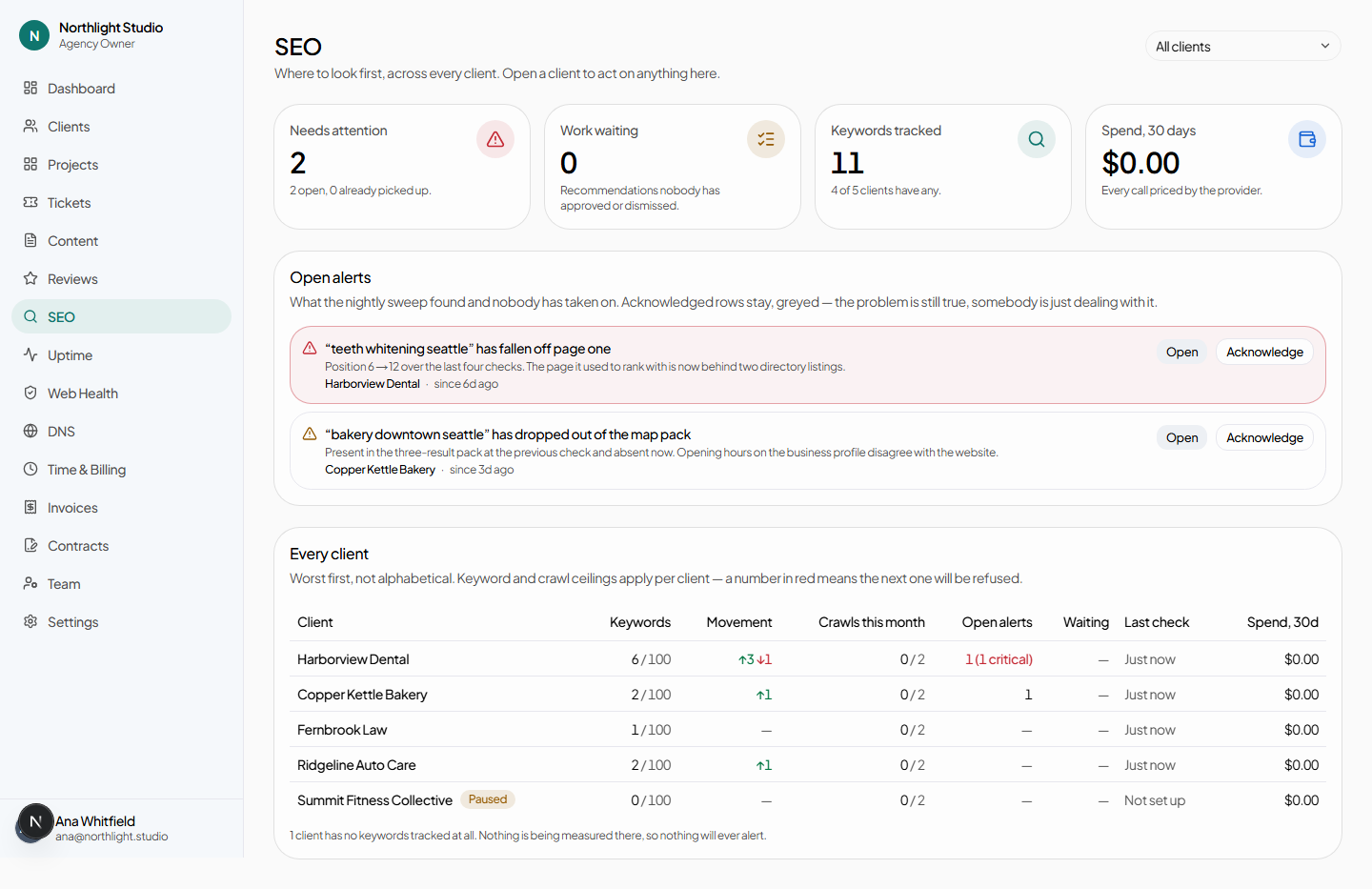
/admin/seo. Built to be read top to bottom before a Monday morning:
- Recent wins — keywords that improved, each linking to its detail page.
- The alert queue — every open alert across every client, each linking to the client and to the alert. Acknowledge clears one, and needs seo.manage; read-only staff see the queue without the button.
- Every client — a table sorted worst first, not alphabetically. A red count means that client is at a ceiling and the next request will be refused.
#Rankings
The default tab on a client's SEO page, and the only one visible without seo.manage.
#Tracking a keyword
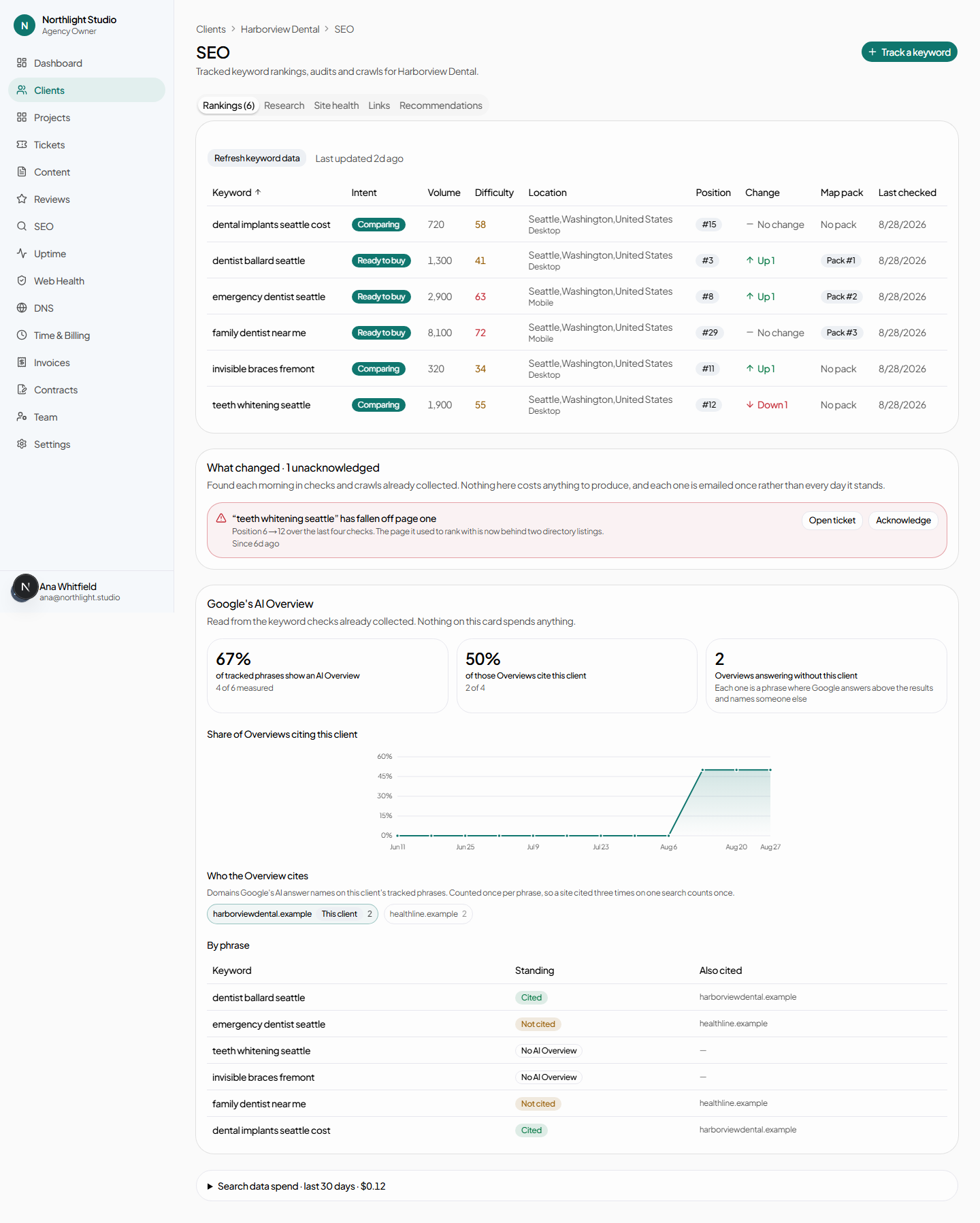
Track a keyword opens a dialog with three fields:
- Keyword phrase — what someone would actually type.
- Location — chosen from the client's locations. This is what makes a local ranking local; a client with no locations has nothing to search from.
- Device — Desktop or Mobile. They rank differently, so track the one that matters.
Each tracked keyword occupies one slot against the per-client keyword ceiling. At the ceiling the page says so and Add keyword is refused rather than silently failing.
#The keyword table
Sortable by any column. Each phrase links to its detail page.
Refresh keyword data queues a volume and difficulty refresh. It is deduplicated per client per day — pressing it twice on the same afternoon costs what pressing it once costs.
#Untracking is not deleting
Untrack keyword stops the scheduled checks, keeps every measurement already taken, and frees the slot. Untracked keywords are behind the Untracked keywords (N) — history kept disclosure, and Track again puts one back.
This is what to use when a client's priorities shift. There is no way to destroy a keyword's history, because that history is what you paid for.
#Alerts
Alerts are found by a daily sweep that reads data already bought — it costs nothing and adds nothing to any bill.
| Alert | Raised when |
|---|---|
| Lost page one | Was on page one at the last check, is not now. |
| Rank dropped | Still ranking, but materially further down. |
| Lost ranking | Was somewhere in the first hundred results, now nowhere in them. |
| Lost local pack | Was in the three-result map pack, and is not now. |
| Lost featured snippet | Owned the featured snippet, and does not now. |
| Lost AI citation | Was cited in Google's AI Overview for this phrase, and is not now. |
| Page erroring | A page that returned a good status on the previous crawl now errors. |
| Referring domains fell | Referring domains dropped materially between two complete backlink refreshes. |
Each alert carries two buttons:
- Open ticket — creates a ticket from the finding, so it becomes tracked work. Needs seo.manage and ticket.create. Once ticketed, the alert shows a Ticketed badge linking to it.
- Acknowledge — you have seen it and are not acting.
#The other cards
- Recent wins — improvements worth mentioning on a call.
- Pages competing with each other — where two of the client's own pages rank for the same phrase, which usually means neither ranks as well as one would.
- Google's AI Overview — the phrases where Google answers with an AI summary, and whether the client is cited in it.
- Search data spend · last 30 days — a disclosure showing what this client has cost in search data.
#One keyword
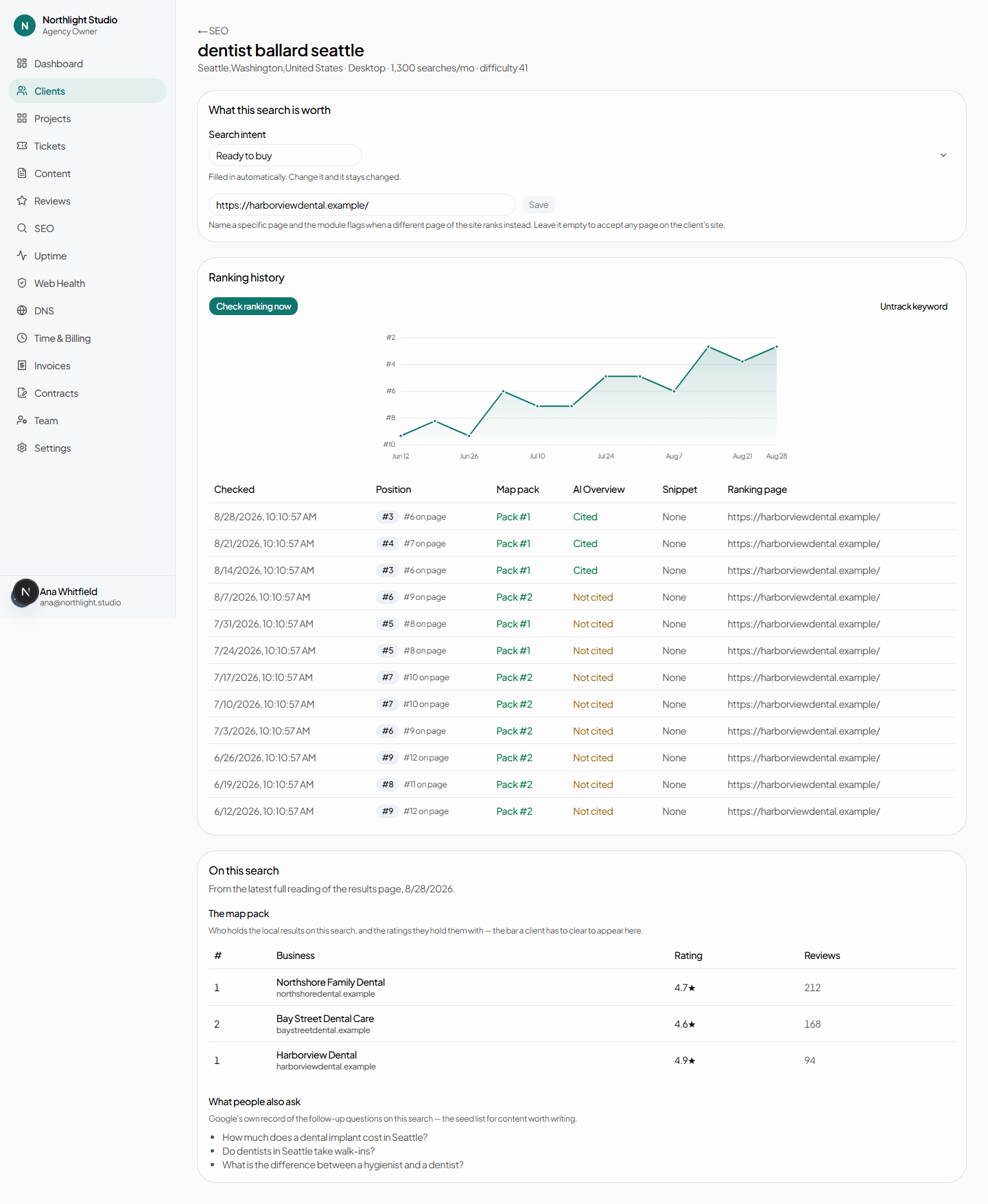
/admin/clients/[id]/seo/[keyword]. Its position history, and:
- Intent — inferred automatically, overridable by hand. A manual choice wins.
- Target URL — the page you want to rank for this phrase, so the competing-pages card can tell you when a different one does.
- Check ranking now — one billed lookup, right now, outside the schedule.
- Untrack keyword / Track again.
- On this search — the map pack and People Also Ask results captured with the last check. Reading this costs nothing; it was already bought.
#Research
#Keyword discovery
Pick a website or type a seed phrase and press Look up. Results come back with volume and difficulty, and each row has a Track button; already-tracked phrases show Tracked instead.
Nothing from a lookup is saved until you press Track. Browsing results costs the lookup and no more.
Lookups are bounded by an allowance, and the button is disabled at zero rather than failing.
#Competitors and keyword gap
Add a competitor domain, then Run analysis to see what they rank for and the client does not. Track this on a gap row starts tracking it. Remove drops a competitor.
#Site health
#Site crawls
Choose a website, set Max pages — bounded by the per-client crawl-page ceiling — and press Start crawl. The confirmation quotes the estimated cost before you commit.
Past crawls are listed and can be reopened; clicking a crawled page expands its issues. When two crawls exist, What changed since the last crawl leads the tab — because a crawl read once and forgotten is a crawl you paid for twice.
#Page audits
A single URL, audited on demand: choose the website, paste the path, press Run audit. Past audits are listed and reopenable. Cheaper than a crawl and the right tool for "is this one page fixed yet".
#Speed and Core Web Vitals
Google’s own measurement of a page: choose the website, paste the path, pick Mobile or Desktop, press Run report. Google loads the page for real, so 10–30 seconds is normal. Past reports are listed and reopenable.
This one is free. It is the only measurement on this tab that costs nothing and draws on no allowance, so there is no reason to ration it.
Each report holds two different things, and the difference matters:
- What real visitors experienced — Core Web Vitals, from Chrome users over the trailing 28 days. This is the half Google’s own assessment is built on, so it is the half that bears on ranking. A page passes only when all three metrics pass; one failing metric fails the page.
- Lighthouse scores and lab timings — a test run on Google’s hardware, on demand. Always available, reproducible, and the half a developer can act on directly. A good lab score is not evidence that real visitors are having a good time.
“Not enough data” is a normal answer, not a fault. Google only reports field data for pages enough Chrome users actually visited, so a smaller client’s interior pages will show lab scores and nothing else — possibly forever. It does not mean the page is slow, and it does not mean the report failed.
Occasionally a report says the figures describe the whole site rather than the page you asked about. That is Google answering with the origin’s data because it had none for that specific URL. The report says so when it happens, because site-wide numbers presented as one page’s are misleading.
#Links
Look up backlinks — or Refresh — per website. Disabled when the allowance is spent.
This is the one figure on the rate card priced per row rather than per call, which is why it has a ceiling of its own: a site-wide summary costs the same whatever the profile size, while asking for the links themselves scales with how many you ask for.
#Recommendations
Generate recommendations reads the latest crawl, the page audits and the current positions, and writes suggestions in the agency's voice. It is an AI call, bounded by a per-client monthly allowance.
Each recommendation has three outcomes:
- Create ticket — approve it, and it becomes tracked work.
- Dismiss — not for this client.
- View ticket — once one exists.
#Cadence — the cost lever
How often tracked keywords are re-checked is set per client on the client's Settings tab:
| Cadence | Relative spend | Use it for |
|---|---|---|
| Monthly | About a quarter of weekly | Stable accounts, small keyword sets |
| Weekly | Baseline | Almost everyone |
| Daily | Roughly seven times weekly | An active campaign, for as long as it runs |
The control warns about the daily multiplier at the point of changing it. Multiply by the number of tracked keywords and the number of clients before setting it as a default.
#What the client sees
With the SEO module enabled and visible, the client's Search visibility page is entirely read-only: searches tracked, on page one, moved up recently, dropped out of results, in the map pack, a visibility chart over time, the tracked-search table, watched and resolved alerts, and a panel for when Google answers with AI.
No control in the client portal spends anything. Everything shown there was already bought by your own checks.
Full cost detail for every action on this page is in Limits and cost.