DNS and domains
Every domain your clients sit on, watched from the outside with nothing installed: expiry, nameservers, mail records and certificates — plus a lookup for domains that are not clients yet.
/admin/dns — every domain your clients' websites sit on, watched from the outside.
This is the half of Web Health that needs nothing installed: these rows appear
because the websites on client profiles exist, not because anybody connected a plugin.
Which makes this the page an agency can look at on their first day, before a single plugin has been paired. Add a website to a client, and its domain starts being watched.
#What is at the top, and why
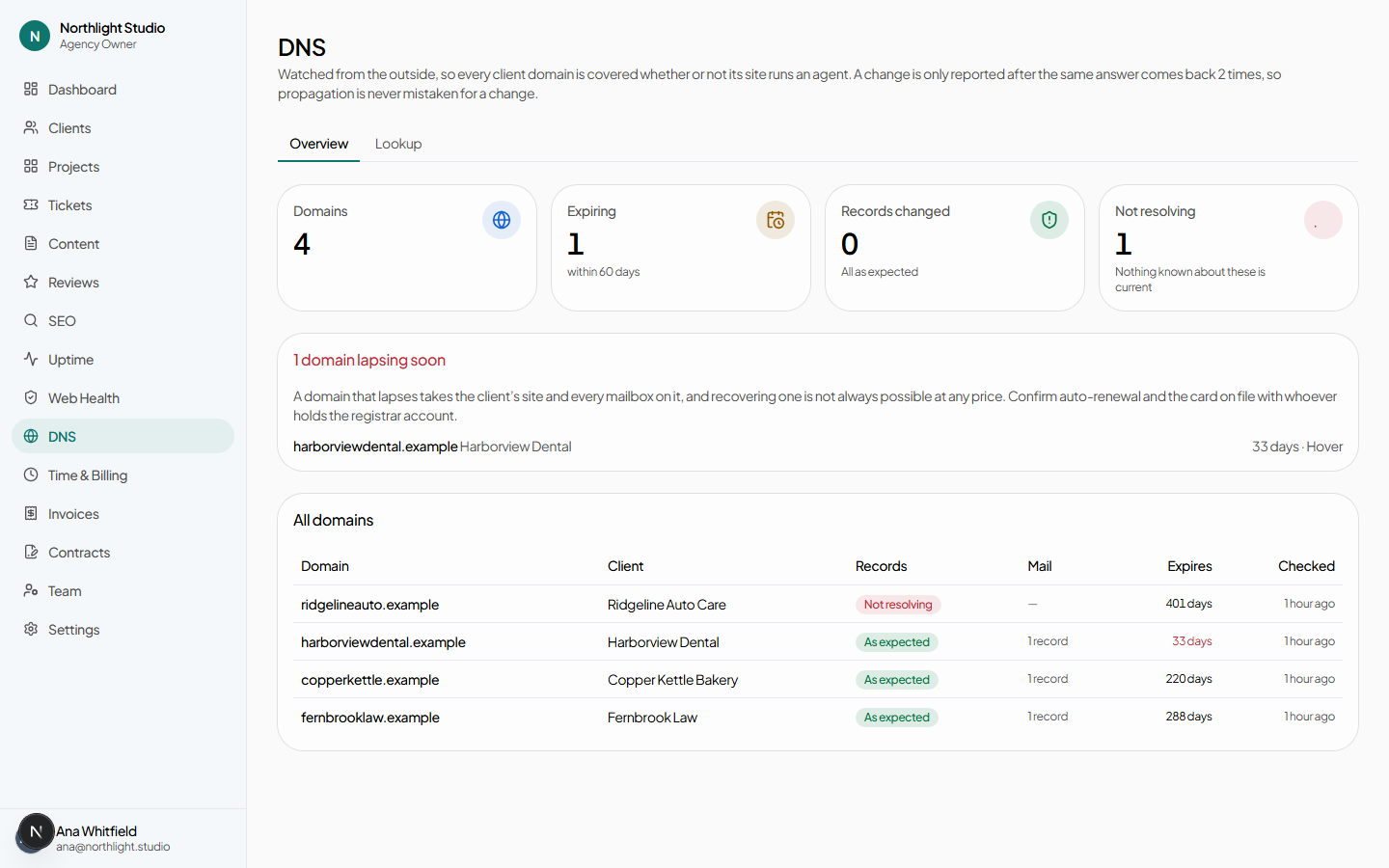
Ordered by what cannot be undone:
- Not resolving — the state where the platform has given up being able to say anything at all about an asset somebody believes is watched.
- Expiring — the only finding in this module with a deadline that cannot be extended after the fact. A lapsed domain is not always recoverable at any price, which is a different category of bad from everything else here.
- Everything else.
#What is watched
| Finding | Raised when |
|---|---|
| Domain expiring | Within 60 days, and escalates to critical inside 14. |
| Domain expired | The registry date has passed. |
| Not resolving | The domain stopped answering. |
| Nameservers changed | Somebody moved the domain's DNS. |
| MX changed | Mail routing moved — often the first sign a client changed provider without telling anyone. |
| SPF / DMARC changed | Email authentication was edited. |
| No SPF record | The domain publishes none at all. |
| Certificate expiring | Within 21 days, critical inside 7. Per website rather than per domain — a certificate belongs to a host, so acme.com and shop.acme.com are one domain and two certificates. |
Findings here become tickets under the same rule as Web Health: one ticket per asset per kind of problem, updated as the situation changes and resolved when it clears.
#One domain
/admin/dns/[domainId] shows the current records, the registrar and expiry, and what
has changed over time — so “when did the MX move, and to what” is answerable rather than
remembered.
#Lookup
/admin/dns/lookup — look up any domain, whether or not it belongs to a client.
The reason this is in the product rather than left to dig is the half a
dig cannot do: turning dns4.p08.nsone.net into NS1, and
client transfer prohibited into unlock this before you try to move it.
Deliberately not restricted to client domains. “Who runs this domain, and can we take it over” is asked most often about a business that is not a client yet — that is the moment this exists for, and it answers the question an onboarding call raises before anybody has signed anything.